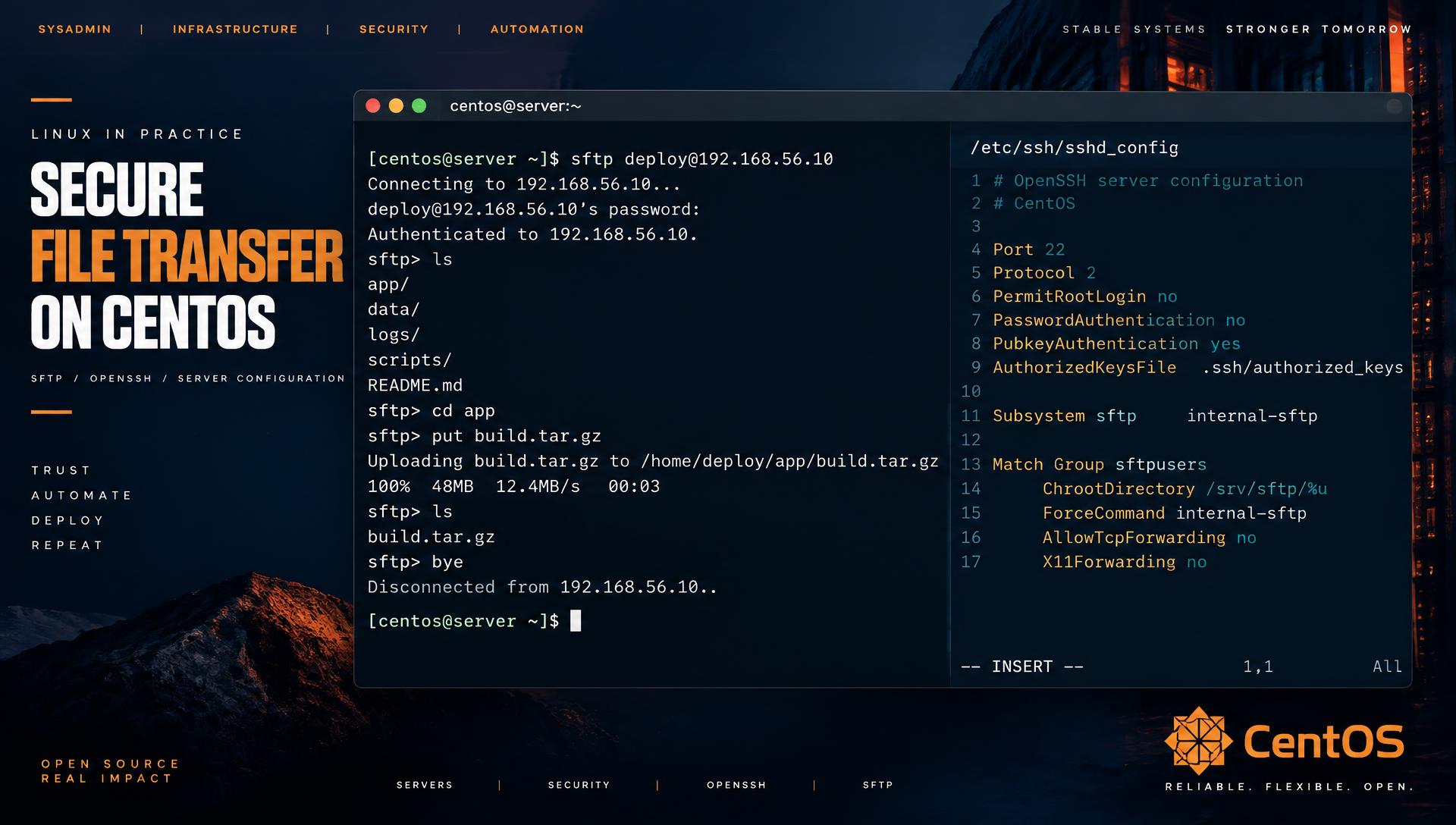
SFTP is the transfer protocol I still hand to auditors without flinching: it rides inside SSH, so you get the same key management, the same host verification and the same logging you already trust. FTPS by comparison drags in certificate chains and passive port ranges, and plain FTP should have been switched off a decade ago. This guide builds a locked-down SFTP server on CentOS Stream 10 with chrooted users, key-only authentication, firewalld rules and the SELinux contexts that break it if you forget them.
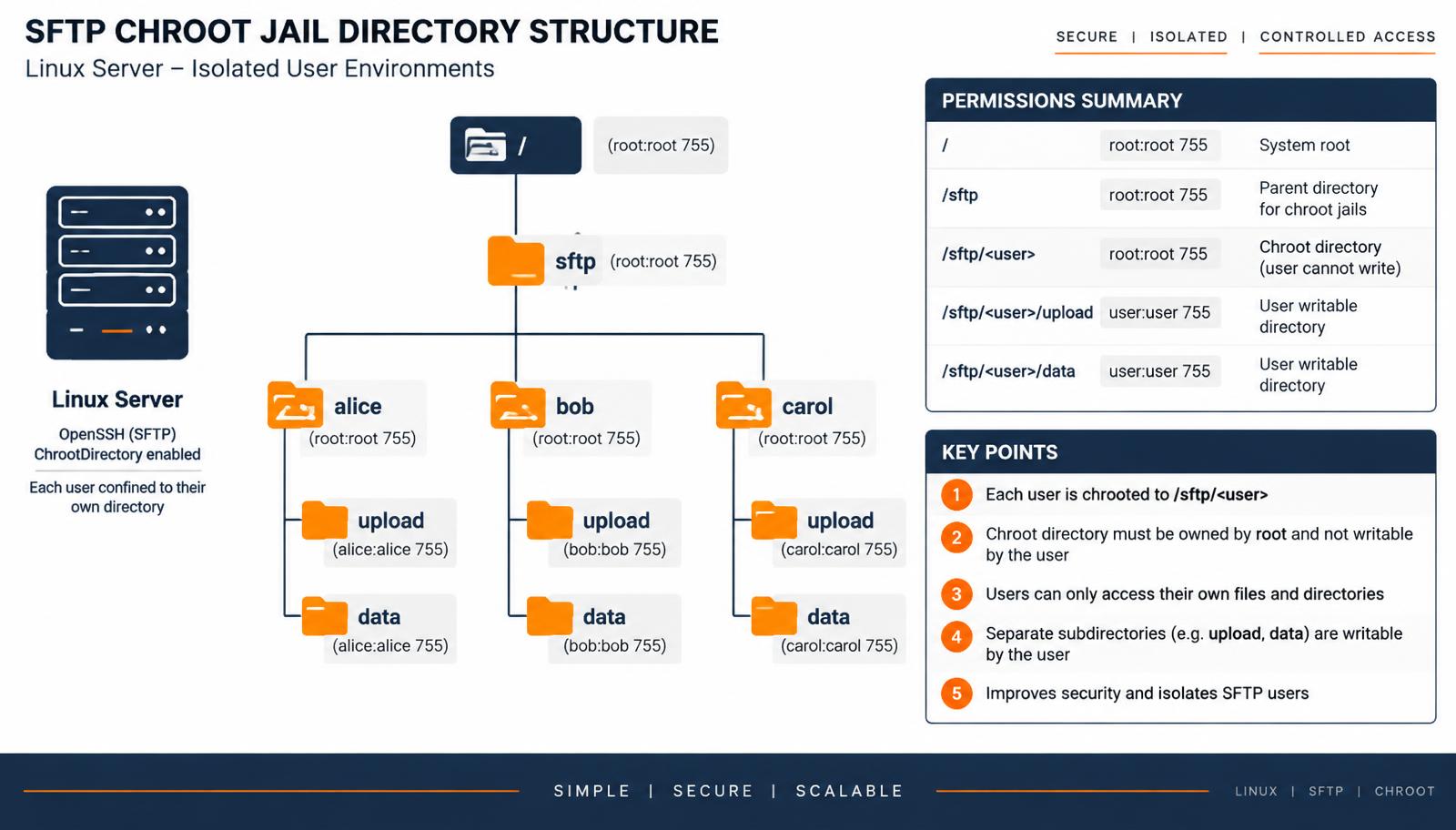
/srv/sftp/<user>, which must be owned by root, with writable subdirectories inside it.Why the chroot rules are so fussy
OpenSSH refuses to chroot into a directory that any non-root account can write to. That is not pedantry – a writable chroot root lets a user create their own .ssh or symlink structure and escape. The rule is simple and absolute:
The
ChrootDirectoryand every component of its path must be owned byrootand not group- or world-writable.
Everything a user actually uploads to therefore lives in a subdirectory inside the jail.
Step 1: packages and baseline
sudo dnf install -y openssh-server policycoreutils-python-utils
sudo systemctl enable --now sshd
ssh -V
# OpenSSH_9.x, OpenSSL 3.x
Step 2: group and directory skeleton
sudo groupadd sftpusers

sudo mkdir -p /srv/sftp
sudo chown root:root /srv/sftp
sudo chmod 755 /srv/sftp

create_sftp_user() {
  u="$1"
  sudo useradd -g sftpusers -s /sbin/nologin -M -d "/srv/sftp/$u" "$u"
  sudo mkdir -p "/srv/sftp/$u/upload" "/srv/sftp/$u/data"
  sudo chown root:root "/srv/sftp/$u"
  sudo chmod 755 "/srv/sftp/$u"
  sudo chown -R "$u:sftpusers" "/srv/sftp/$u/upload" "/srv/sftp/$u/data"
  sudo chmod 750 "/srv/sftp/$u/upload" "/srv/sftp/$u/data"
}

create_sftp_user alice
create_sftp_user bob
-s /sbin/nologin means these accounts can never get a shell even if the SSH configuration is later loosened.
Step 3: configure sshd
Do not edit the stock /etc/ssh/sshd_config body – CentOS Stream 10 reads /etc/ssh/sshd_config.d/*.conf first, and drop-ins survive package upgrades cleanly.
sudo tee /etc/ssh/sshd_config.d/50-sftp.conf >/dev/null <<'EOF'
Subsystem sftp internal-sftp -f AUTHPRIV -l INFO

Match Group sftpusers
    ChrootDirectory /srv/sftp/%u
    ForceCommand internal-sftp -u 0027
    AllowTcpForwarding no
    AllowAgentForwarding no
    X11Forwarding no
    PermitTunnel no
    PasswordAuthentication no
EOF

sudo sshd -t && sudo systemctl reload sshd
Two details earn their keep. internal-sftp is built into sshd, so the jail needs no /bin, no libraries and no device nodes – the reason the old "copy ldd output into the chroot" guides are obsolete. The -f AUTHPRIV -l INFO flags give you real per-file audit lines in /var/log/secure.
Step 4: SSH keys for a jailed user
Because the user's home is the jail and it is root-owned, the usual ~/.ssh/authorized_keys path does not work. Keep keys outside the jail:
sudo mkdir -p /etc/ssh/authorized_keys
sudo chmod 755 /etc/ssh/authorized_keys
sudo install -m 644 /dev/null /etc/ssh/authorized_keys/alice
sudo tee -a /etc/ssh/authorized_keys/alice < alice_ed25519.pub

# add to the drop-in, inside the Match block
AuthorizedKeysFile /etc/ssh/authorized_keys/%u
# on the client
ssh-keygen -t ed25519 -C "alice@sftp"
sftp -i ~/.ssh/id_ed25519 alice@192.168.56.10Step 5: firewalld
sudo firewall-cmd --permanent --add-service=ssh
sudo firewall-cmd --reload
sudo firewall-cmd --list-all
Moving SSH to a non-standard port is cosmetic against real attackers but does cut log noise. If you do it, tell both firewalld and SELinux:
sudo semanage port -a -t ssh_port_t -p tcp 2222
sudo firewall-cmd --permanent --add-port=2222/tcp
sudo firewall-cmd --reload
Step 6: SELinux, the step everyone skips
CentOS ships SELinux enforcing. Files under /srv do not carry the home-directory context sshd expects for SFTP writes, so uploads fail with a bare permission denied while the POSIX bits look perfect.
sudo semanage fcontext -a -t ssh_home_t "/srv/sftp(/.*)?"
sudo restorecon -Rv /srv/sftp

# allow users to read/write in their jail
sudo setsebool -P ssh_chroot_rw_homedirs on

# if the jail sits on an NFS or CIFS backend
sudo setsebool -P use_nfs_home_dirs on
Confirm before and after with ls -Z /srv/sftp.
Troubleshooting
"Connection closed" or "packet_write_wait: Connection reset"
Almost always a bad chroot. Run sshd in the foreground on a spare port and read the reason directly:
sudo /usr/sbin/sshd -d -p 2200
# fatal: bad ownership or modes for chroot directory "/srv/sftp/alice"
sudo chown root:root /srv/sftp/alice
sudo chmod 755 /srv/sftp/aliceCheck every parent too – /srv itself being group-writable breaks it just as hard.
"Permission denied" on upload, correct POSIX permissions
SELinux. Check for AVC denials:
sudo ausearch -m avc -ts recent
sudo sealert -a /var/log/audit/audit.log | head -40
Fix the context with semanage fcontext as above rather than turning SELinux off. setenforce 0 to confirm the diagnosis is fine; leaving it that way is not.
"This service allows sftp connections only"
Expected – ForceCommand internal-sftp is doing its job and refusing an interactive SSH. Use sftp or scp -O, not ssh.
Uploads land with the wrong permissions
The client's umask wins by default. Pin it server-side with internal-sftp -u 0027, which gives 640 files and 750 directories regardless of what the client sends.
User can see other users' directories
They should not be able to – but if the chroot is /srv/sftp instead of /srv/sftp/%u, everyone shares one jail. The %u token is the whole security boundary; verify with sudo sshd -T -C user=alice | grep -i chroot.
Auditing who moved what
sudo journalctl -u sshd -t internal-sftp --since "1 hour ago"
sudo grep 'internal-sftp' /var/log/secure | tail -20
# ... open "/upload/build.tar.gz" flags WRITE,CREATE,TRUNCATE mode 0640
# ... close "/upload/build.tar.gz" bytes read 0 written 50331648
A short war story
A partner integration failed for two days with nothing but Connection closed at their end. Our logs showed a successful publickey authentication immediately followed by a disconnect. The cause was a tidy-up script that ran chown -R sftpuser:sftpusers /srv/sftp nightly – perfectly reasonable-looking, and it broke the chroot every midnight. Now the ownership is asserted by configuration management and the nightly job only touches the upload subdirectory. If your SFTP works after a rebuild and dies overnight, look at what cron is doing to your permissions.
Hardening checklist
- Key-only authentication inside the
Matchblock; no passwords. AllowTcpForwarding no– otherwise an SFTP-only user can still tunnel into your network.- Per-user quotas (
xfs_quotaorsetquota) so one client cannot fill the volume. - Rate-limit with
fail2banwatching/var/log/secure. - Modern ciphers only: add
KexAlgorithms curve25519-sha256,Ciphers chacha20-poly1305@openssh.com,aes256-gcm@openssh.com. - Back up
/etc/ssh/sshd_config.d/and the key directory with your configuration management, not by hand.
Per-user quotas
One misbehaving client should not be able to fill the volume for everyone. On an XFS filesystem – the CentOS default – enable project or user quotas:
# mount option in /etc/fstab
/dev/mapper/vg-sftp  /srv/sftp  xfs  defaults,uquota  0 0

sudo mount -o remount /srv/sftp
sudo xfs_quota -x -c 'limit bsoft=45g bhard=50g alice' /srv/sftp
sudo xfs_quota -x -c 'report -h' /srv/sftp
The soft limit gives you a warning window; the hard limit is what actually protects the server.
Rate limiting and brute-force protection
sudo dnf install -y fail2ban
sudo tee /etc/fail2ban/jail.d/sshd.local >/dev/null <<'EOF'
[sshd]
enabled = true
backend = systemd
maxretry = 4
findtime = 10m
bantime  = 1h
EOF
sudo systemctl enable --now fail2ban
sudo fail2ban-client status sshd
With password authentication already disabled the practical risk is low, but the log volume alone justifies the jail.
Testing the jail properly
Do not declare victory because one upload worked. Run through this list:
| Test | Command | Expected |
|---|---|---|
| Interactive SSH blocked | ssh alice@host | "This service allows sftp connections only" |
| Cannot escape the jail | sftp> cd /etc | Lands in the jail's own empty /etc or fails |
| Cannot write to jail root | sftp> mkdir /test | Permission denied |
| Can write to upload dir | sftp> put file upload/ | Success, mode 0640 |
| Port forwarding blocked | ssh -L 8080:10.0.0.1:80 alice@host | Refused |
| Password login blocked | sftp -o PubkeyAuthentication=no alice@host | Permission denied (publickey) |
Automate it – a ten-line shell script run after every configuration change catches the drift that manual checks miss.
Onboarding and offboarding cleanly
# offboard
sudo usermod -L -s /sbin/nologin bob
sudo rm -f /etc/ssh/authorized_keys/bob
sudo tar czf /backup/sftp-bob-$(date +%F).tgz -C /srv/sftp bob
sudo userdel bob
sudo rm -rf /srv/sftp/bob
Revoking the key file is the step that actually ends access; locking the account alone does not stop key-based logins on every OpenSSH build, so do both.
Frequently asked questions
Is SFTP the same as FTPS?
No. SFTP is a subsystem of SSH on port 22. FTPS is old FTP wrapped in TLS, with a control channel plus a passive data port range to firewall. If you have the choice, choose SFTP.
Can I let a user in without creating a Linux account?
Not with stock OpenSSH – every SFTP user is a POSIX user. If you need database-backed accounts, run a dedicated SFTP daemon such as sftpgo instead.
Does this work identically on RHEL 10, Rocky and AlmaLinux?
Yes. The package names, drop-in configuration directory, firewalld and SELinux steps are the same across the EL 10 family.
How do I share one directory between several SFTP users?
Bind-mount it into each jail: mount --bind /srv/common /srv/sftp/alice/common, add it to /etc/fstab, and give the shared directory a common group with the setgid bit.