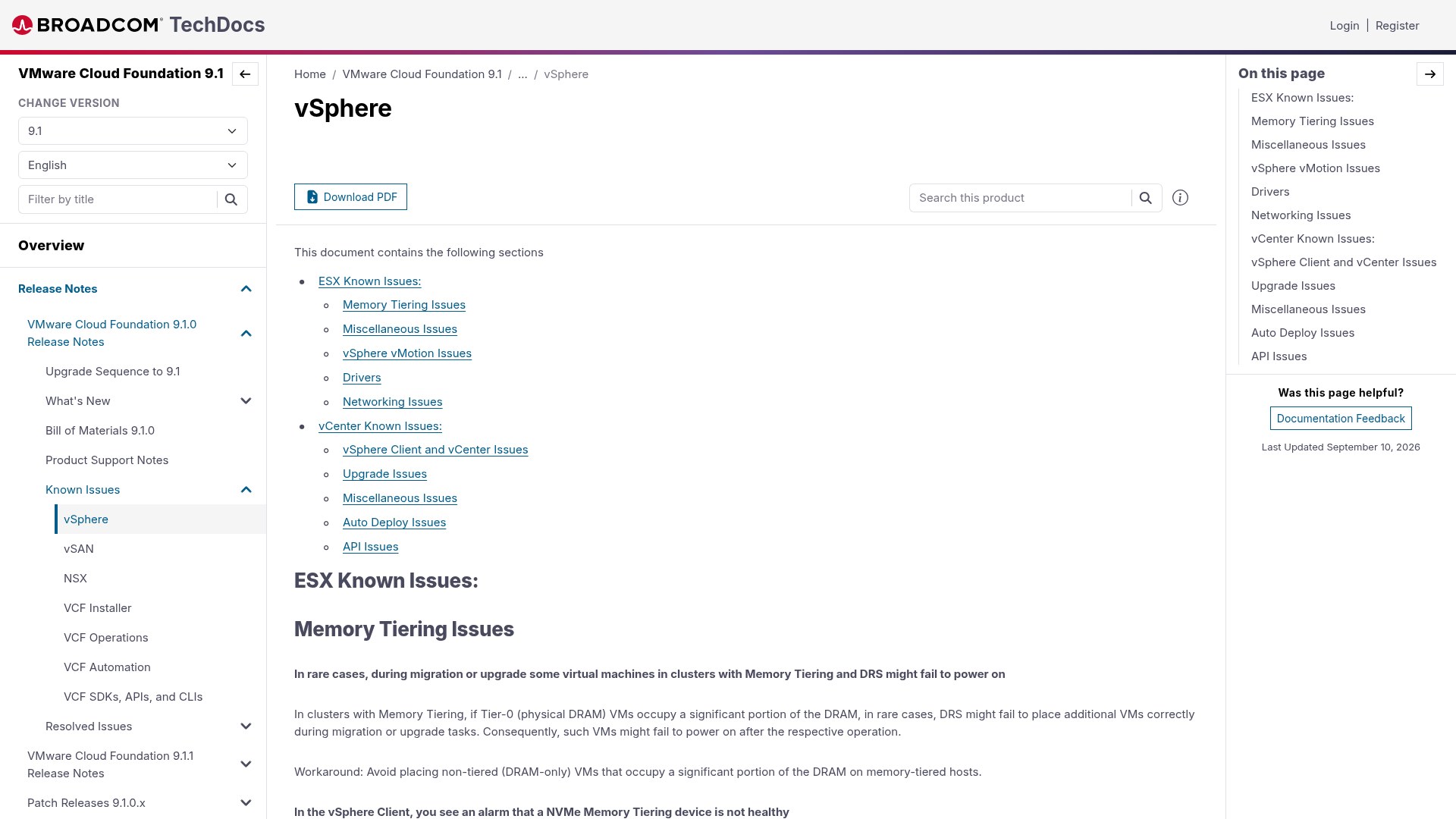
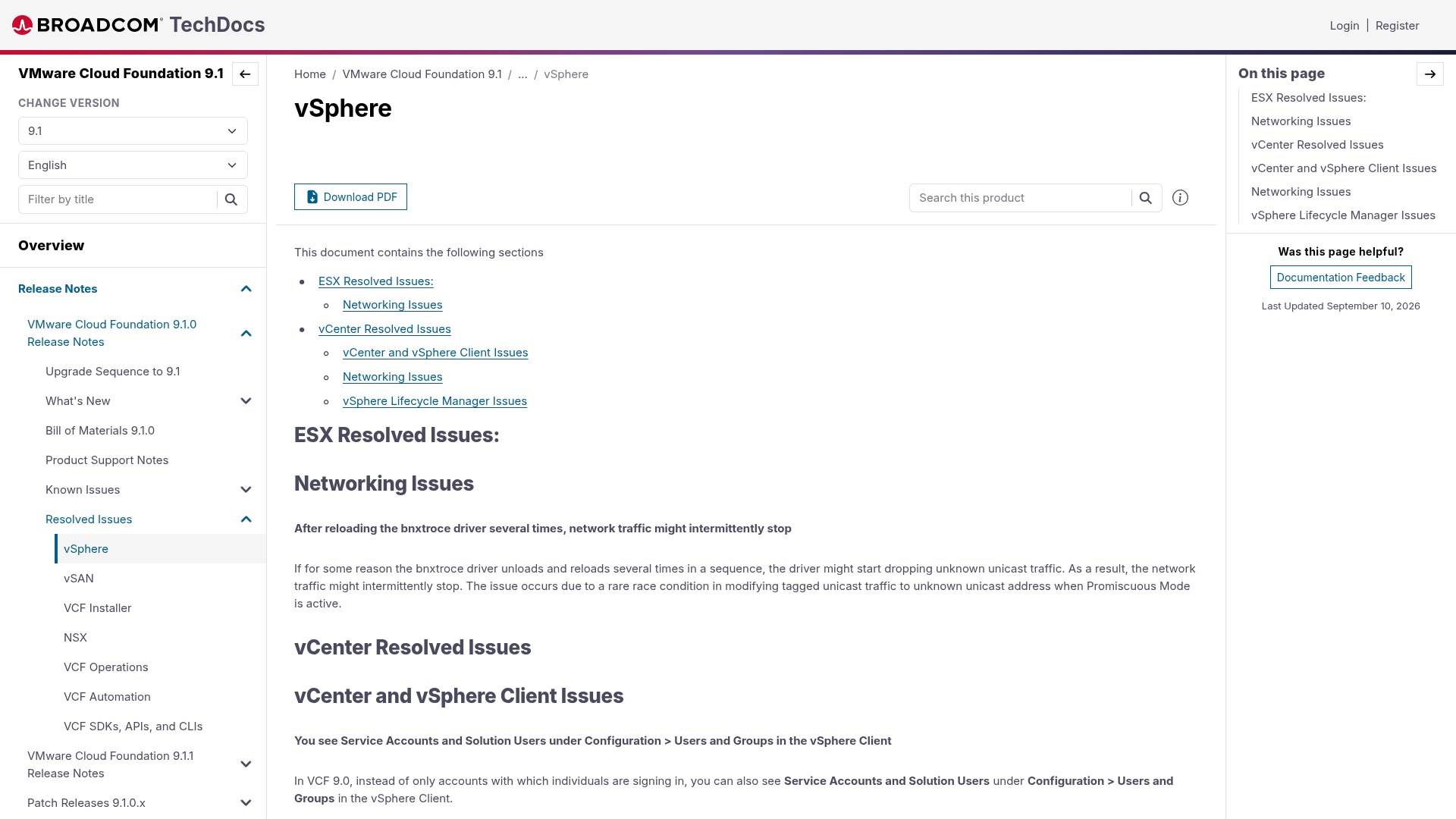
VMware Cloud Foundation 9.1 shipped on 12 May 2026, and like every release the interesting reading is not the What's New page – it is the Resolved Issues list. That list is a catalogue of the bugs that ruined somebody's maintenance window before yours. This article walks through every vSphere resolved issue published in the VCF 9.1.0 vSphere resolved issues document, explains the error you would have seen, the root cause behind it, and what the fix actually changes.
The builds these fixes land in
Before you match a symptom to a fix, confirm you are actually running the build that contains it. The VCF 9.1.0 Bill of Materials pins the exact numbers – anything below these and the bugs described here are still live in your estate.
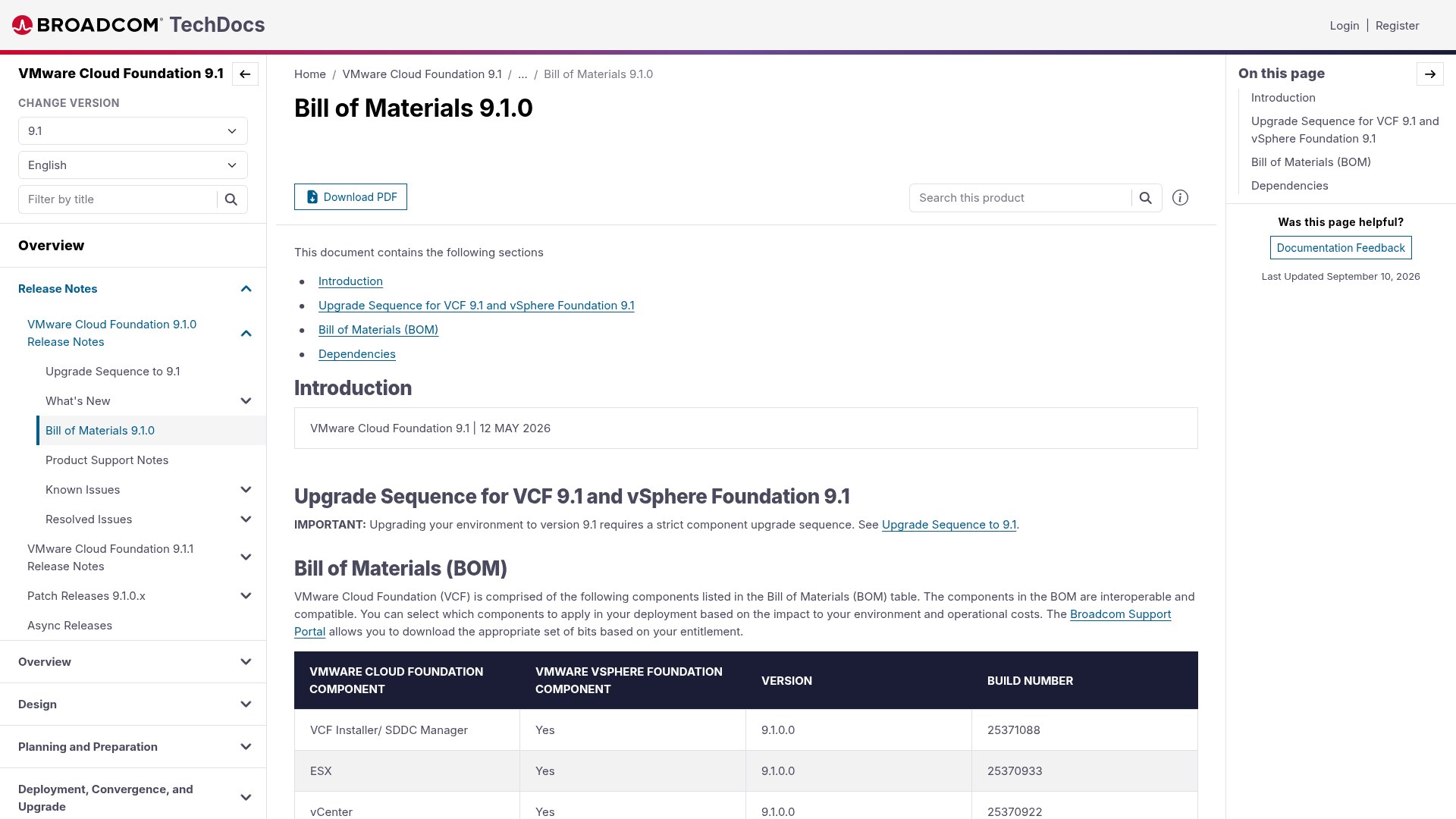
| Component | Version | Build number |
|---|---|---|
| VCF Installer / SDDC Manager | 9.1.0.0 | 25371088 |
| ESX | 9.1.0.0 | 25370933 |
| vCenter | 9.1.0.0 | 25370922 |
Check what you are on before you start chasing ghosts:
[root@esx01:~] vmware -vl
VMware ESX 9.1.0 build-25370933

# From vCenter, across the whole cluster
PS> Get-VMHost | Select Name, Version, Build | Sort Build
1. bnxtroce driver reload drops unknown unicast traffic
Section: ESX → Networking Issues.
The symptom. Network traffic to and from an ESX host stops intermittently. Nothing is down – uplinks stay up, LLDP still shows neighbours, vmkping to the gateway may still work – but a subset of traffic simply evaporates and comes back on its own. The release note states that if the bnxtroce driver unloads and reloads several times in a sequence, the driver may start dropping unknown unicast traffic.
Root cause. Broadcom describes it as a rare race condition in the code path that converts tagged unicast traffic into unknown unicast when Promiscuous Mode is active. Each driver reload re-programs the NIC's L2 filters; when reloads stack up quickly, the filter state and the promiscuous state get out of step, and frames whose destination MAC is not in the hardware filter table are silently discarded rather than flooded to the port group.
Why it bites specific environments. You need three things together: a Broadcom RoCE-capable NIC using bnxtroce, repeated driver reloads (firmware or driver upgrade loops, a flapping RDMA device, or a VIB reinstall cycle), and at least one port group with Promiscuous Mode accepted. That last ingredient is why nested labs, packet capture appliances, NSX-V style environments and some virtual firewall deployments hit it while everyone else never sees it.
How to confirm it on a host still running the old build:
# Which driver is bound to the NIC?
esxcli network nic get -n vmnic4 | grep -i -E 'driver|firmware'

# Is the module being reloaded repeatedly?
grep -i bnxtroce /var/log/vmkernel.log | tail -50

# Which port groups accept promiscuous mode?
esxcli network vswitch standard policy security get -v vSwitch0
The workaround before you patch. Stop the reload cycle. Do firmware and driver updates in a single pass in maintenance mode rather than iteratively, and turn Promiscuous Mode off on any port group that does not genuinely need it. If you must keep promiscuous port groups, a host reboot after driver work resets the filter table cleanly – far more reliable than another vmkload_mod cycle.
The fix. Resolved in ESX 9.1.0.0. The filter-modification path is now serialised against the promiscuous state change, so a reload cannot leave the NIC with an inconsistent unicast filter.
2. Service Accounts and Solution Users clutter Users and Groups
Section: vCenter → vCenter and vSphere Client Issues.
The symptom. In VCF 9.0, Configuration > Users and Groups in the vSphere Client listed not just human accounts but also service accounts and solution users. On a large VCF fleet that turns a 30-row list into hundreds of rows of machine identities.
Why it matters more than cosmetics. Access reviews are an audit control. If an auditor asks you to evidence every identity that can log in to vCenter and the list is padded with internal solution users, you either explain the difference for every row or hand over a list that looks like uncontrolled account sprawl. It also makes accidental deletion of a solution user a real risk during a cleanup exercise.
The fix. In VCF 9.1 the vSphere Client shows only the accounts individuals sign in with. The full list of service accounts and solution users is now internal to vCenter and retrievable on demand with dir-cli:
/usr/lib/vmware-vmafd/bin/dir-cli service list \
  --login administrator@vsphere.local

/usr/lib/vmware-vmafd/bin/dir-cli user find-by-name \
  --account svc-account-name --login administrator@vsphere.local
If you have automation or a compliance script that scraped the Users and Groups view, rewrite it against dir-cli or the vCenter API before you upgrade – the rows it depended on will no longer be there.
3. VAMI shows a raw localisation key in the Type column
Section: vCenter → vCenter and vSphere Client Issues.
The symptom. In the Virtual Appliance Management Interface, under Available updates, an update classified as Bug Fix and Security rendered in the Type column as:
vami.manage.update.type.Bug Fix and SecurityRoot cause. A missed string lookup. The VAMI front end builds a localisation key by concatenating a prefix with the update type; because the composed key had no matching entry in the resource bundle, the UI fell back to printing the key itself. Classic i18n failure – harmless to the appliance, confusing to the operator.
Why it is worth knowing. It is the sort of defect that makes an engineer stop mid-patch and open a support case, because a string that looks like debug output in a patching UI does not inspire confidence. The update itself always installed correctly. Resolved in 9.1; the column now reads Bug Fix and Security.
4. Batch remediation fails with ScanTask timeouts in large environments
Section: vCenter → vCenter and vSphere Client Issues.
This is the one that will have cost people the most sleep. In large environments, remediation run as a single batch produced intermittent timeout errors during the host scanning phase. In the vSphere Client:
An internal error occurred while fetching the compliance result from the host XXXXXX.

Failed to get task result for task(XXXXXX) on host(host-XXXX) :
Dynamic exception type: VumVapi::Lib::VapiClient::wait_error
std::exception::what: Operation timed out.
Root cause, stated plainly by Broadcom. No task actually failed. The status request simply waited in the queue longer than the 30-second threshold. In a big batch, scan requests queue behind each other; once queue depth pushes a response past 30 seconds, the client gives up and surfaces a hard error for an operation that was still progressing normally on the host.
Why this is such a nasty failure mode. A false failure during remediation is worse than a real one. The operator sees a red task, aborts the window, and starts investigating a healthy host. Worse, re-running remediation on hosts that were mid-scan adds more queue pressure and makes the next batch more likely to time out – a self-reinforcing spiral on exactly the large clusters where the maintenance window is tightest.
How to recognise it versus a genuine remediation failure:
| Signal | ScanTask timeout (false failure) | Genuine remediation failure |
|---|---|---|
| Host state | Healthy, responsive, scan completes later | Host stuck entering maintenance mode or disconnected |
| Error text | wait_error / Operation timed out | VIB conflict, dependency or staging error |
| Pattern | Random hosts, only in big batches | Same host fails every attempt |
| Retry behaviour | Succeeds when run in a smaller batch | Fails identically at any batch size |
Workaround on pre-9.1 vCenter. Split remediation into smaller batches – 8 to 12 hosts is a sensible ceiling on a busy vCenter – and stagger clusters rather than launching everything at once. Check vmware-vum-server logs to confirm the scan completed after the client gave up before you touch the host.
grep -i -E 'scan|timed out' \
  /var/log/vmware/vmware-updatemgr/vum-server/vmware-vum-server.log | tail -40
The fix. Resolved in the 9.1 release, so large single-batch remediations no longer report phantom failures from queue latency.
5. SPS goes unhealthy with OutOfMemoryError when adding many IOFilter hosts
Section: vCenter → vCenter and vSphere Client Issues.
The symptom. Add a large number of ESX hosts with active IOFilters (VASA providers) to the inventory in quick succession, and the Storage Policy Service reports unhealthy. SPS generates core dumps containing:
Exception: java.lang.OutOfMemoryError thrown from the UncaughtExceptionHandler
in thread "Catalina-utility-3"
SEVERE: Error sending periodic event
java.util.concurrent.ExecutionException: java.lang.OutOfMemoryError: Java heap space
  at java.base/java.util.concurrent.FutureTask.report(Unknown Source)
  at org.apache.catalina.core.StandardServer.startPeriodicLifecycleEvent(StandardServer.java:889)
  ...
Caused by: java.lang.OutOfMemoryError: Java heap space
Root cause. Two conditions combine: a burst of host additions each registering an IOFilter VASA provider, and a vCenter whose Storage Monitoring Service or TRUSTED_ROOT trust store already holds a large number of certificates. Every provider registration walks the trust store; with hundreds of certificates and hundreds of near-simultaneous registrations, the resulting object churn exhausts the SPS Java heap and Tomcat's periodic lifecycle thread dies with OOM.
The operational tell. Storage policy compliance checks stop updating, datastore capability sets look stale, and policy-based provisioning starts failing – all while the hosts themselves look perfectly healthy. If you are mid-way through onboarding a large cluster and storage policies quietly stop working, look at SPS before you look at the array.
service-control --status vmware-sps
grep -i OutOfMemoryError /var/log/vmware/vmware-sps/sps.log
ls -l /storage/core/ | tail
Mitigation before patching. Onboard IOFilter-enabled hosts in waves rather than all at once, and prune expired or duplicate certificates from the trust stores. Restarting vmware-sps clears the immediate condition but does nothing about the next batch.
6. Read-only users cannot extract an image in the Add Host wizard
Section: vCenter → vCenter and vSphere Client Issues.
The symptom. With read-only access on an ESX host, the Image step of the Add Host wizard breaks. Choose Extract the image on the host, click Next, accept the host certificate or thumbprint, and instead of the expected host image information you get Image not available with an Extract Image button staring back at you.
Root cause. A permission check applied at the wrong layer. Reading the software specification off a host is a read operation, but the extract path required a privilege level the read-only role does not carry, so the call returned nothing and the UI rendered its empty state rather than a meaningful permission error.
Why it is more than an edge case. Plenty of organisations give architects and auditors read-only vCenter roles precisely so they can inspect image definitions without being able to change anything. This bug silently blocked exactly that workflow, and the Image not available message sent people hunting for depot problems that did not exist.
7. DirectPath Profile identifier changes across VM power cycles
Section: vCenter → Networking Issues.
The symptom. The DirectPathProfile (DPP) identifier computed for a DirectPath device with DynamicBackingInfo differs after each power cycle of the VM.
Root cause. Three properties feed the DPP identifier: device name, allowed devices list and assignedId. The first two persist across power cycles; assignedId is generated dynamically at power-on. So the identifier is not stable, and you cannot reuse the spec from one DPP in the config spec of another VM – the computed profile will not match even when every other property is identical.
Scope. Broadcom is explicit: this affects only accelerator devices using DynamicBackingInfo. vGPU devices, vendor device groups and DVX devices are unaffected. If you write automation that clones GPU or accelerator assignment between VMs – a common pattern in AI/ML platform teams – this is the bug that made your idempotent playbook non-idempotent.
8. Lifecycle Manager image creation fails despite imported depots
Section: vCenter → vSphere Lifecycle Manager Issues.
The symptom. Multiple offline and online depots are imported into vSphere Lifecycle Manager. You build a desired image from one of them and draft validation fails with something like:
Software Solution com.vmware.vsphere-wcp with version
9.0.1.31.6.0-24913416 cannot be found in depot
Root cause. In rare cases the metadata of one imported depot overwrites the metadata of a previously imported depot, effectively removing the older one. The UI still lists the depot; the content behind it is gone. Broadcom notes this is more likely in VCF environments, where depots arrive from several sources – the VCF depot, an offline bundle and a vendor add-on depot, for example.
Recognising it quickly. The giveaway is that the failure names a component you know you imported, and re-importing that single depot makes the draft validate again. If a component is genuinely missing, re-import fixes nothing.
# List depots currently known to vLCM
Get-VMHost | Out-Null   # ensure connected
Get-View -Id 'EsxImageDepotManager' 2>$null

# Re-import the offline bundle and re-validate the draft
The fix. Resolved in 9.1, so depot metadata from one import no longer clobbers another.
What I would actually do with this list
Two of these – the ScanTask timeout and the SPS heap exhaustion – are the ones I would plan around, because both appear precisely when you are doing large-scale work under time pressure. If you are still on 9.0 and have a big remediation or a large cluster onboarding coming up, batch the work small and watch SPS health. Everything else on the list is quality-of-life: annoying, occasionally misleading, but not a maintenance-window killer.
And if you want the bigger picture across ESXi builds, read our breakdown of ESXi release notes bugs, root causes and fixes, plus the practical guides on vCenter appliance services failing to start and ESXi storage APD and PDL conditions.
Source: Broadcom TechDocs – VMware Cloud Foundation 9.1.0 Release Notes, vSphere Resolved Issues (last updated 10 September 2026). Screenshots are captures of the official documentation pages.