Network File System is the quiet workhorse of every Linux estate I have ever run. Shared build artefacts, home directories, Kubernetes ReadWriteMany volumes, backup landing zones – they all end up on an NFS export eventually. This guide builds a production-shaped NFS server on Ubuntu 26.04 LTS from a clean install, mounts it from clients, and then works through the errors that actually show up in the real world: access denied by server, clnt_create: RPC: Program not registered, stale file handles and the permission mismatches that make files land as nobody:nogroup.
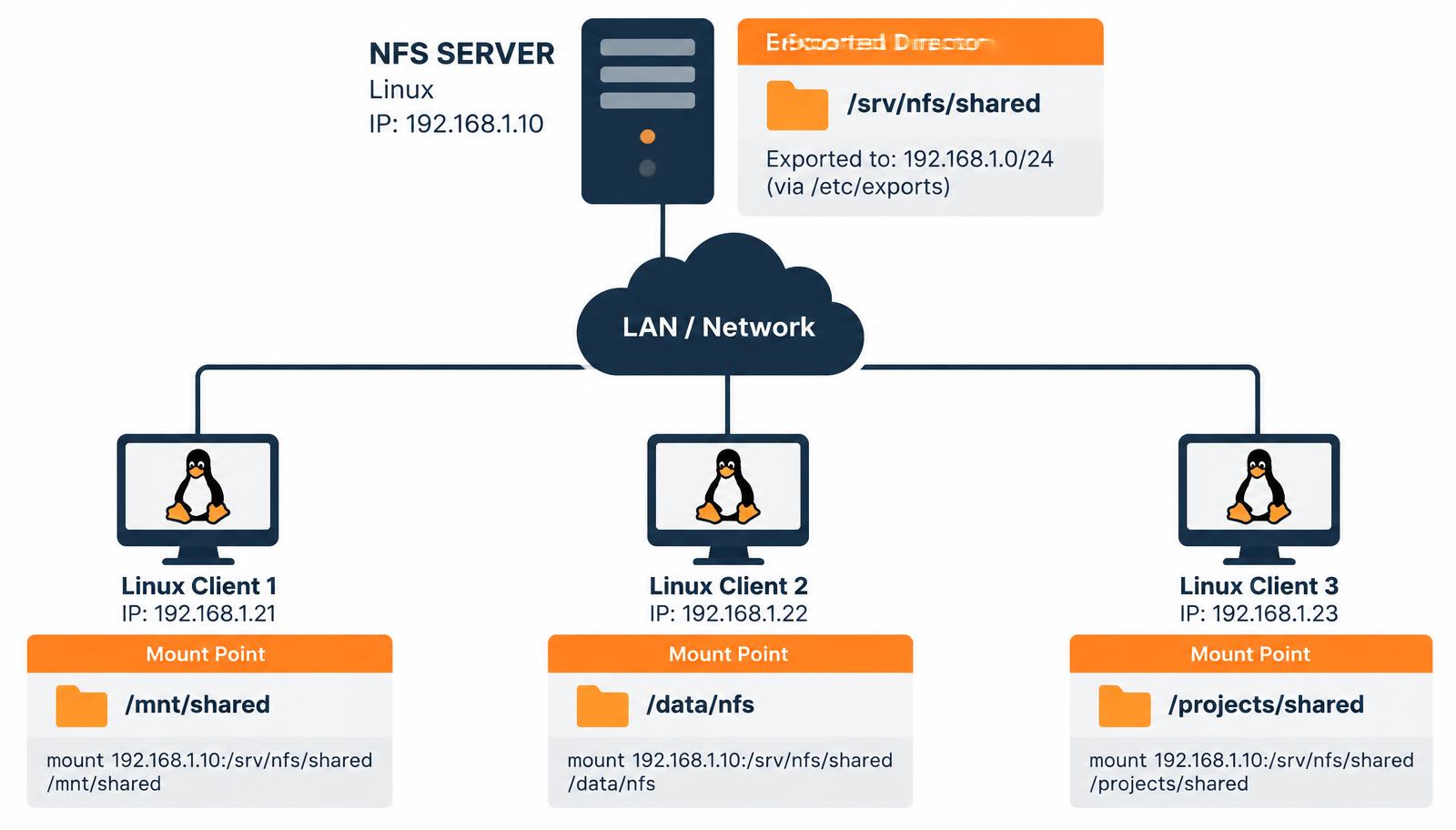
/srv/nfs/shared to clients on 192.168.1.0/24.What changed in Ubuntu 26.04 LTS
Ubuntu 26.04 LTS ships nfs-kernel-server built on the 6.x kernel NFS stack with NFSv4.2 as the default protocol version. That matters more than it sounds:
- NFSv4 uses a single TCP port – 2049. There is no separate
mountd,statdorlockdport to punch through the firewall unless you deliberately enable NFSv3. - All exports live inside a single pseudo-filesystem root. Clients mount paths relative to that root, not absolute server paths.
- Identity is mapped by
nfsidmapusing the NFSv4 domain, not purely by numeric UID, when Kerberos is in play. ufwis installed but inactive on a fresh server image; enabling it later is a classic way to break a working export at 2am.
Step 1: install the server packages
sudo apt update
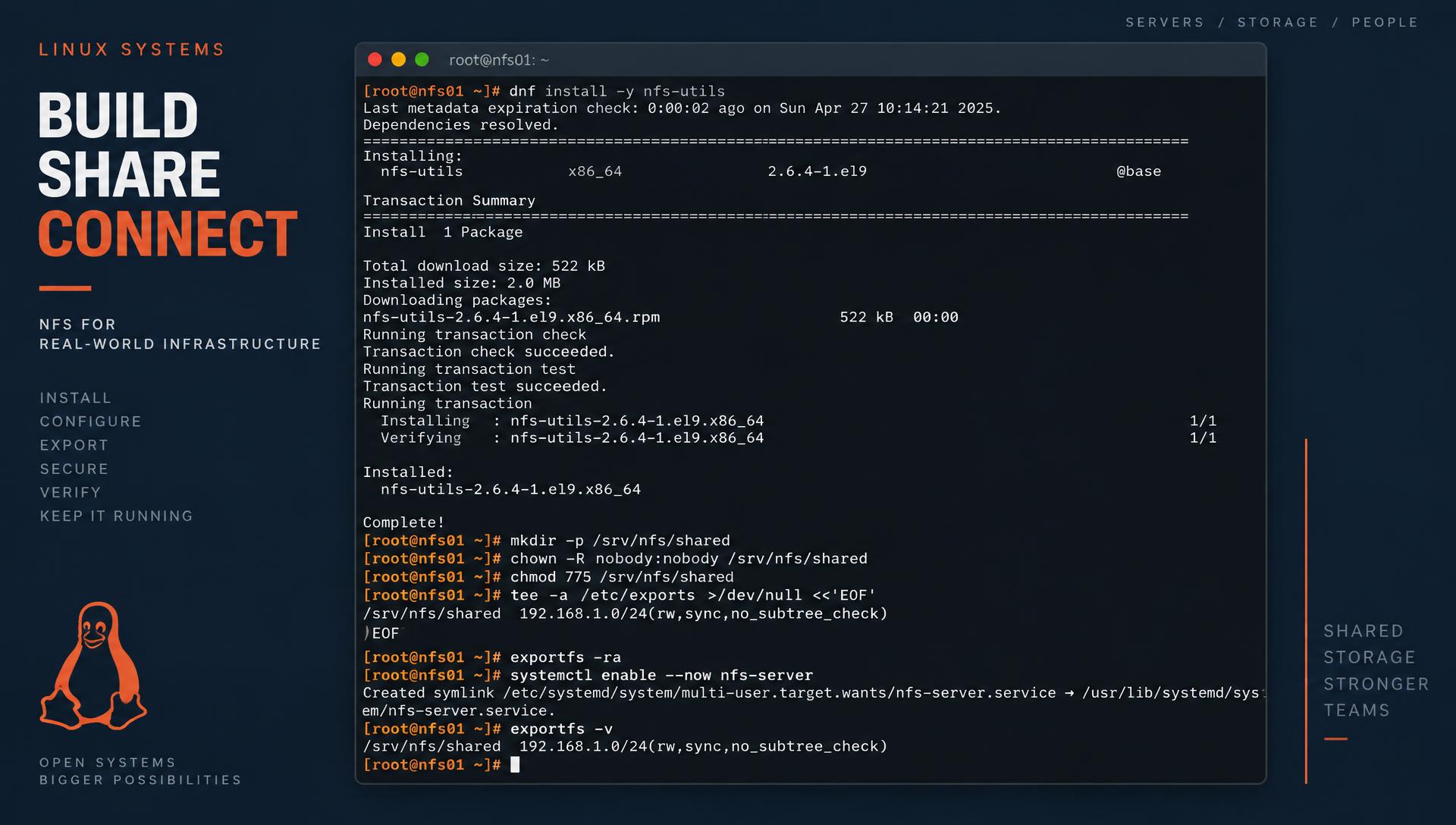
sudo apt install -y nfs-kernel-server

# confirm the version and protocol support
/usr/sbin/rpc.nfsd --version
cat /proc/fs/nfsd/versions
# -2 +3 +4 +4.1 +4.2
The -2 is expected – NFSv2 has been dead for years. If you see +3 and you do not need it, disabling v3 later removes a whole class of portmapper problems.
Step 2: create and own the export directory
Put exports on their own path, never inside /home or /root. I use /srv/nfs as the parent so the pseudo-root stays tidy.
sudo mkdir -p /srv/nfs/shared
sudo chown -R nobody:nogroup /srv/nfs/shared
sudo chmod 2775 /srv/nfs/shared
The 2 in 2775 sets the setgid bit so new files inherit the directory group. On a shared export that single bit prevents most of the "I cannot write to my colleague's folder" tickets.
Step 3: write /etc/exports
sudo tee -a /etc/exports >/dev/null <<'EOF'
/srv/nfs/shared  192.168.1.0/24(rw,sync,no_subtree_check,root_squash)
EOF

sudo exportfs -ra
sudo exportfs -v
# /srv/nfs/shared 192.168.1.0/24(sync,wdelay,hide,no_subtree_check,sec=sys,rw,secure,root_squash,no_all_squash)
Option reference
| Option | What it does | Use it when |
|---|---|---|
rw / ro | Read-write or read-only export | Default to ro for anything you do not need writable |
sync | Server replies only after the write hits stable storage | Always, unless you enjoy silent data loss |
async | Acknowledges writes before flushing | Scratch/build caches only |
root_squash | Maps client root to nobody | Always, except dedicated backup targets |
no_subtree_check | Skips per-request parent checks | Default; faster and avoids rename races |
all_squash + anonuid/anongid | Forces every client user to one identity | Kiosk-style or single-application shares |
Step 4: firewall
# NFSv4 only - one port
sudo ufw allow from 192.168.1.0/24 to any port 2049 proto tcp
sudo ufw enable
sudo ufw status numbered
If you still need NFSv3, pin the ancillary services to fixed ports in /etc/nfs.conf first, otherwise they land on random high ports and the firewall rule you wrote last week stops matching after a reboot:
[mountd]
port = 20048
[statd]
port = 32765
outgoing-port = 32766
[lockd]
port = 32803
udp-port = 32769
Step 5: mount from a client
sudo apt install -y nfs-common
sudo mkdir -p /mnt/shared
sudo mount -t nfs4 192.168.1.10:/srv/nfs/shared /mnt/shared

# verify what was actually negotiated
mount | grep nfs
nfsstat -m
Make it persistent with a systemd-aware entry rather than a bare fstab line. _netdev and the automount options stop boot hanging when the server is down:
192.168.1.10:/srv/nfs/shared /mnt/shared nfs4 _netdev,noatime,rsize=1048576,wsize=1048576,hard,timeo=600,retrans=2,x-systemd.automount 0 0Use hard, not soft. A soft mount returns I/O errors to the application during a transient server hiccup and quietly corrupts half-written files; a hard mount blocks and recovers.
Troubleshooting: the errors you will actually hit
mount.nfs: access denied by server while mounting
Nine times out of ten this is the export ACL, not authentication. Check from the client:
showmount -e 192.168.1.10
# Export list for 192.168.1.10:
# /srv/nfs/shared 192.168.1.0/24
If the export is listed but the mount fails, confirm the client address really is inside the CIDR (dual-homed hosts often source from a different interface), then check journalctl -u nfs-server -n 50 on the server. A forgotten sudo exportfs -ra after editing /etc/exports is the single most common cause.
clnt_create: RPC: Program not registered
This means showmount is speaking NFSv3/RPC to a server that only offers v4. Either accept it – showmount is a v3 tool and NFSv4 exports are discovered by mounting the pseudo-root – or re-enable v3. To browse a v4 server instead:
sudo mount -t nfs4 192.168.1.10:/ /mnt/tmp && ls /mnt/tmpFiles owned by nobody:nogroup
Classic NFSv4 idmapping mismatch. The server and client must agree on the domain:
# /etc/idmapd.conf on BOTH sides
[General]
Domain = lab.local

sudo systemctl restart nfs-idmapd     # server
sudo nfsidmap -c                      # client: clear the id cache
If you are using plain sec=sys without Kerberos, the real fix is simpler: make the numeric UIDs and GIDs match on both machines, or force them with all_squash,anonuid=1500,anongid=1500 in the export.
Stale file handle
ls: cannot access '/mnt/shared': Stale file handleThe exported inode changed underneath the client – usually because the directory was deleted and recreated, or the underlying filesystem was remounted. Remount the client:
sudo umount -l /mnt/shared && sudo mount -aTo make handles survive server rebuilds, pin an fsid in the export: /srv/nfs/shared 192.168.1.0/24(rw,sync,fsid=1).
Permission denied writing as a normal user
Check in this order: export has rw; the mount is not ro (findmnt -T /mnt/shared); the POSIX mode on the server allows it; and AppArmor is not intercepting. On Ubuntu, AppArmor rarely blocks NFS itself but frequently blocks an application that lives on an NFS path – check journalctl -k | grep apparmor="DENIED".
Slow throughput or stalls
nfsiostat 2 5
mountstats --nfs /mnt/shared | head -40
ss -tin dst 192.168.1.10
Look for retransmits above ~1% and rising average RTT. In my experience the top three causes are an MTU mismatch on a jumbo-frame path (test with ping -M do -s 8972), sync exports on a disk with no write cache, and a client using the default 128 KB rsize because the mount options never took effect.
A short war story
A CI fleet I looked after started failing builds every Monday morning with Stale file handle. Nothing in the NFS logs. It turned out the weekend snapshot job was destroying and recreating the export directory on the storage array, which changed the inode each time. Adding fsid=17 to the export and switching the snapshot job to write into the directory rather than replace it ended a three-week ghost hunt. Pin your fsid on anything that gets recreated.
Hardening checklist before you call it done
- Export to specific CIDRs, never
*. - Keep
root_squashon; addno_root_squashonly for a dedicated backup client, and firewall it to that one IP. - Disable NFSv3 if nothing needs it: set
vers3=nunder[nfsd]in/etc/nfs.conf, thensudo systemctl restart nfs-server. - Run over a dedicated storage VLAN. NFS with
sec=systrusts the client's claimed UID – treat the wire as trusted or move tosec=krb5p. - Monitor
/proc/net/rpc/nfsdforththread exhaustion and raisethreads=in/etc/nfs.confon busy servers.
Quick verification script
#!/usr/bin/env bash
set -e
systemctl is-active --quiet nfs-server && echo "nfsd: running"
exportfs -v
ss -tlnp | grep -q ':2049' && echo "port 2049: listening"
touch /srv/nfs/shared/.write-test && rm /srv/nfs/shared/.write-test && echo "export writable"
Run that from cron once an hour and you will know an export broke before your users do.
Tuning NFSv4 for real workloads
The defaults are conservative. Three knobs matter more than everything else combined.
1. Server thread count
Every concurrent NFS request needs an nfsd thread. The Ubuntu default of 8 is fine for a handful of clients and hopeless for a build farm.
# /etc/nfs.conf
[nfsd]
threads = 64

sudo systemctl restart nfs-server
grep th /proc/net/rpc/nfsd
The th line shows a histogram of how often threads were busy. If the right-hand buckets are non-zero and climbing, you are thread-starved.
2. Transfer sizes
Modern kernels negotiate 1 MB reads and writes, but an old fstab entry or a middlebox can drag that down. Confirm what you actually got:
nfsstat -m | grep -E 'rsize|wsize'
# rsize=1048576,wsize=1048576,namlen=255,acregmin=3,...
3. Attribute caching
For shares where many clients read files that rarely change – container images, static assets – raising the attribute cache cuts GETATTR chatter dramatically:
mount -o actimeo=60,nocto 192.168.1.10:/srv/nfs/shared /mnt/sharedDo not do this on a share where two hosts coordinate through file changes; you will introduce minutes of skew.
On-demand mounts with autofs
If a client only occasionally touches the share, autofs is kinder than a permanent mount – the server can reboot without hanging anything.
sudo apt install -y autofs
echo '/nfs  /etc/auto.nfs  --timeout=60' | sudo tee -a /etc/auto.master.d/nfs.autofs
echo 'shared  -fstype=nfs4,rw,hard  192.168.1.10:/srv/nfs/shared' | sudo tee /etc/auto.nfs
sudo systemctl restart autofs
ls /nfs/shared   # mounts on first access
Exporting more than one directory
With NFSv4 you can present several paths under one clean namespace using bind mounts and fsid=0:
sudo mkdir -p /export/{projects,backups}
sudo mount --bind /srv/projects /export/projects
sudo mount --bind /data/backups /export/backups

# /etc/exports
/export              192.168.1.0/24(ro,fsid=0,no_subtree_check)
/export/projects     192.168.1.0/24(rw,sync,no_subtree_check,root_squash)
/export/backups      192.168.1.50(rw,sync,no_subtree_check,no_root_squash)
Clients then mount 192.168.1.10:/projects – short, stable paths that do not leak your server's internal layout. Remember to add the bind mounts to /etc/fstab with x-systemd.before=nfs-server.service so they exist before nfsd starts.
Frequently asked questions
Does NFS encrypt traffic?
Not with the default sec=sys. Data and metadata cross the wire in clear text. Use sec=krb5p with a Kerberos realm for encryption, or keep NFS on an isolated storage VLAN or WireGuard tunnel.
Can Windows clients mount it?
Yes, via the optional Client for NFS feature, but identity mapping is painful. If Windows is a first-class citizen, run Samba alongside the NFS export on the same directory and set vfs objects = acl_xattr.
NFS or SMB for container volumes?
NFSv4.2 for Linux workloads – it supports server-side copy, sparse files and better locking semantics for ReadWriteMany claims.
Why did my mount hang forever?
A hard mount to an unreachable server blocks by design. Use umount -f -l to detach, and add x-systemd.automount so boot never waits on storage.