
Tag

vSphere 7

5 articles

VMware vCenter 7 Services
VMware

Top 6 known bugs in VMware vSphere 7

The version of VMware vSphere 7 has been out for some time now, but it hasn’t been without its share of bugs. While many of these issues have already been resolved, there are still a few that remain and often re-appear in later releases. In this blog post, we’ll take a closer look at the […]

27 Nov 20225 min
VMware vSphere 7 Deprecated Features
ESXi

VMware vSphere 7 Deprecated Features, Plugins and Add-ons – Changes revealed

VMware has announced that VMware vSphere 7 will no longer support several VMware features, add-ons, and plugins. The deprecation of these features may come as a disappointment to some users; however, it is important to remember that VMware is constantly innovating and introducing new features to its product line. As such, the decision to deprecated […]

7 Oct 20225 min

VM DRS Score vSphere 7
VMware

VMware vSphere 7 VM DRS Scores

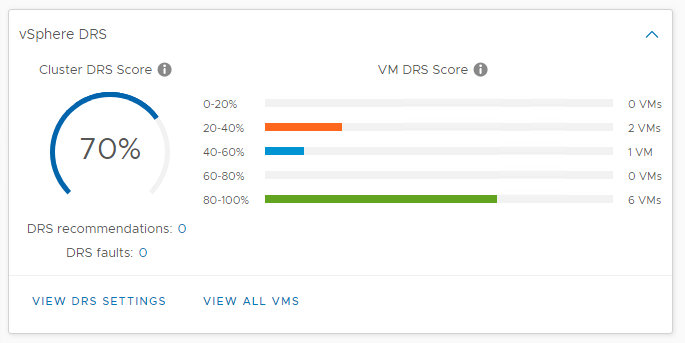
In previous vSphere versions, DRS used cluster-wide standard deviation model calculations to maximise workload ‘happiness’ as seen in the diagram below. In essence, this means that DRS based on the ESXi host usage baseline, a particular threshold range that can be adjusted using the DRS migration threshold. The re-vamped logic of the DRS takes a somewhat different approach from its predecessor. The new DRS logic quantifies virtual machine happiness by using the VM DRS score. First of all, let me stress that the VM DRS Score is not a health score for a virtual machine! It’s about the execution efficiency of a virtual machine (VM). The scores vary from 0 to 100 percent and are divided into buckets, 0-20 percent, 20-40 percent, and so on. Obtaining a VM DRS score of 80-100 percent suggests that there is little to no resource contention. It doesn’t inherently mean that a virtual machine in the 80-100 percent bucket is doing better than a virtual machine in the bottom bucket. That’s because there are a number of metrics that affect the score of the VM. Not only performance metrics are used, but capacity metrics are also incorporated into the algorithm. Performance drivers for the VM DRS score are contention dependent, using metrics such as CPU% Ready Time, good CPU cache behaviour, and memory swap. The reserve resource capacity or headroom of the current ESXi host is also taken into account to assess the VM DRS ranking. Would this virtual machine be able to burst resource usage on its current host and at what level? Goodness VM DRS Modelling The fundamental principle of the new logic of DRS is that VMs have the ideal throughput and true throughput for each resource (CPU, memory, and network). If there is no contention, the ideal throughput of the VM is equal to the real throughput. We care about resource contention when several VMs are in contention over access to a shared machine or network resource. Migration cost is also considered in this modelling.

8 Aug 20202 min

VMware vCenter 7 Infrastructure Profile Management
VMware

vCenter 7 Server Profiles – Infrastructure Profiles

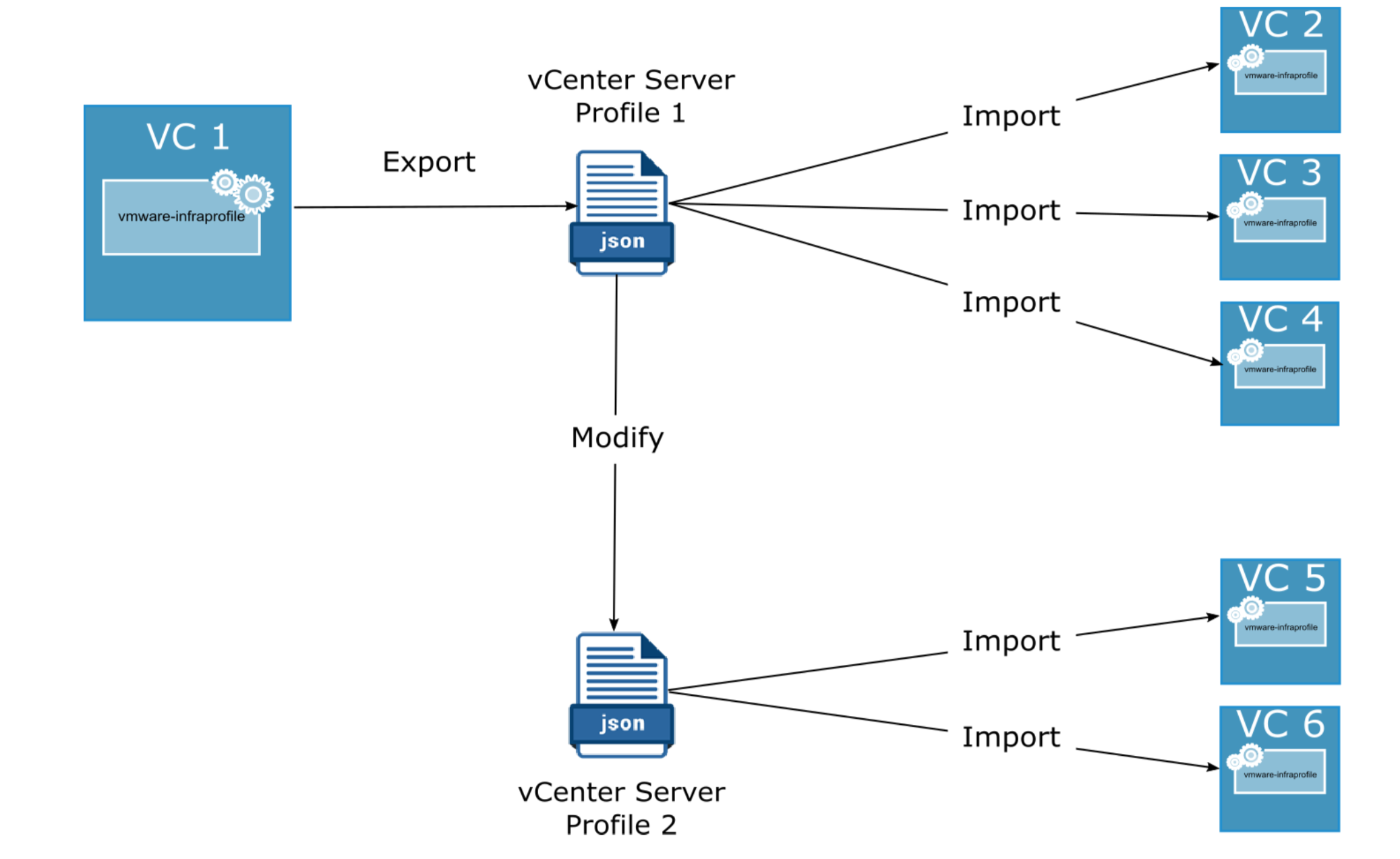
In vSphere 7.0, infrastructure profiles or also known as vCenter Profiles, allow you to eliminate configurations for vCenter Server and preserve configuration consistency across multiple vCenter Server instances. With vCenter Infrastructure Profile Management (IPM), you can export the existing configuration of the vCenter server and import the exported configuration information to another instance of a vCenter server. vCenter Infrastructure profiles have many advantages: Streamlined configuration and change management of VCenter Server instances Fast identification of non-compliance with standard configurations Automated remediation Export and import configuration of vCenter Server in a user-readable format. vCenter Infrastructure Profile Management (IPM) uses a modular web-based action platform. You can access IPM via an API package. IPM is an independent service within the VCenter Server Appliance and it runs under “vmware-infraprofile “ See other new vCenter 7 services. IPM offers the following interfaces to the API: List of items Exporting Validity Import Infrastructure Profiles is a JSON file, which includes configuration of the vCenter server. Managing the vCenter Infrastructure Profile Service: To see the […]

11 Jul 20201 min

VMware vCenter 7 Services
VMware

New services and how to start, stop and restart in VMware vCenter 7

Since the introduction of VMware vSphere 7, there a number of new services related to VMware vCenter Server 7. The syntax to start, stop or restart hasn’t changed at all. Let us remind you of the commands and highlight the new services, which are specific to VMware vCenter 7 version. To list the vCenter Server […]

4 May 20202 min