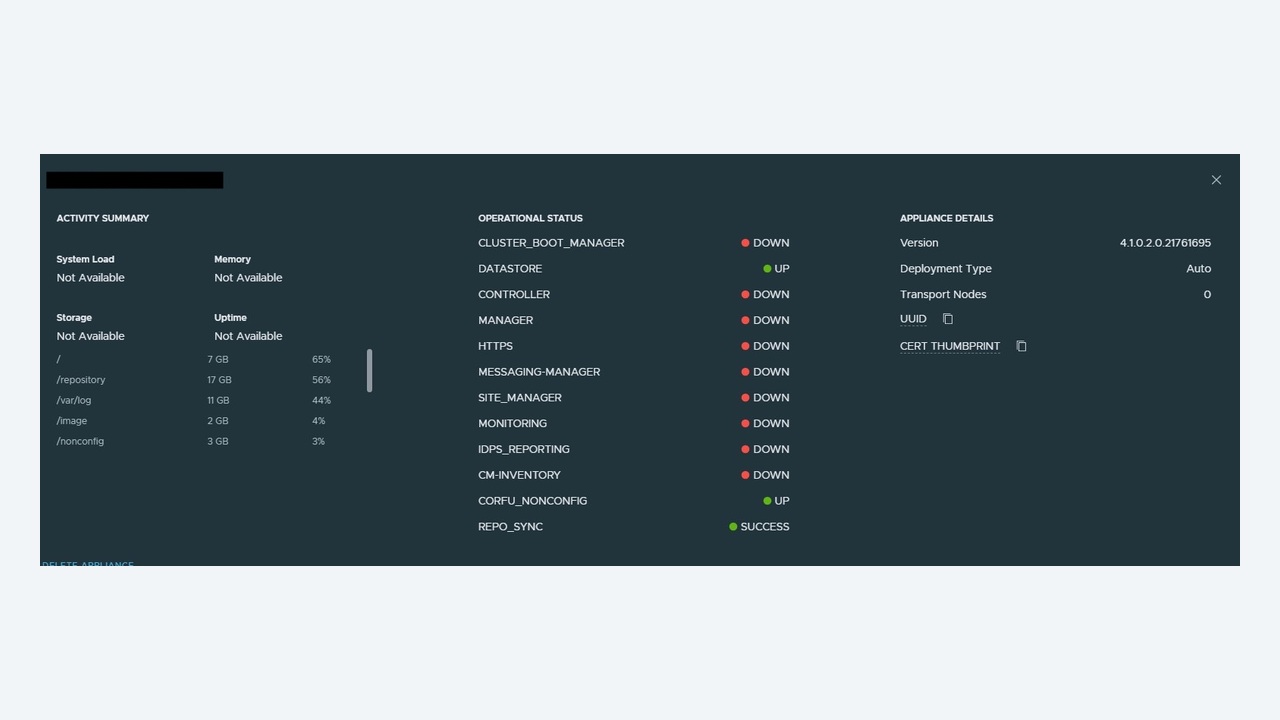
NSX Manager is deployed as a three-node cluster for a reason: it hosts the management plane, the control plane and the policy role together. When one node degrades, the estate keeps forwarding traffic – the data plane is in the hypervisor and survives a total manager outage – but you lose the ability to change anything, and you are one failure away from a much worse day. This article covers diagnosing and recovering a degraded NSX Manager cluster methodically.
What “degraded” actually means
The cluster runs a distributed datastore (Corfu) plus a set of services on each node. Cluster status aggregates three groups:
- Datastore – the Corfu log that holds configuration. Requires a quorum of two of three nodes.
- Cluster boot manager – node membership and startup coordination.
- Control plane / manager services – policy, proton, http, search, monitoring and others.
A single service down on one node marks the whole cluster degraded even though everything works. Losing two of three nodes puts the datastore into read-only, which is when the UI starts throwing errors on every save.

Step 1: get the facts from the CLI, not the UI
SSH to any manager node as admin and run:
get cluster status
get cluster status verbose
get cluster config
get service
get cluster status verbose is the important one – it lists each group, each member and the reason a member is down. Then check the node itself:
get nodes
get node version
get filesystem-stats
get interface eth0
Nine times out of ten the verbose output plus the filesystem stats identify the cause in under a minute.
Step 2: the four causes that account for most cases
1. Disk full
By far the most common. Log growth, an uncollected support bundle, or a failed upgrade leaves / or /config above 90 per cent, at which point Corfu refuses writes and services start falling over. Confirm with get filesystem-stats, then as root:
df -h
du -sh /var/log/* | sort -h | tail -20
find /var/log -name "*.gz" -mtime +7 -delete
Never delete anything under /config or the Corfu directories by hand. Clear logs and old upgrade bundles only, then restart the affected services.
2. Time skew
The cluster is intolerant of clock drift between nodes. More than a few seconds of skew breaks certificate validation and Corfu consensus:
get clock
get ntp-server
set ntp-server 10.0.0.5
Point every node at the same NTP sources that vCenter uses and verify synchronisation before doing anything else – fixing skew often resolves the rest on its own.
3. Expired or mismatched certificates
Certificates on manager nodes, the cluster VIP, and the principal identity used by vCenter all expire. An expired node certificate makes a node unable to rejoin the cluster and can break host control plane connections.
get certificate api
get certificate cluster
Replace through the UI (System → Certificates) or the API, and remember the VIP certificate is separate from node certificates.
4. Resource starvation
Manager nodes are sized deliberately (medium is 6 vCPU / 24 GB for production). Deploying small in production, or running managers on an overcommitted cluster without reservations, causes services to time out and restart in a loop. Check get cluster status verbose for services that keep transitioning, and check the host for CPU ready time on the manager VMs.
Step 3: restarting services safely
Restart the specific failed service before restarting anything larger:
get service proton
restart service proton
restart service http
Wait for the service to report running and re-check get cluster status before touching the next thing. If a whole node needs a reboot, do it one node at a time and confirm the cluster returns to STABLE between reboots. Rebooting two nodes at once loses quorum and turns a degraded cluster into an outage.
Step 4: when a node cannot rejoin
If a node is permanently broken, detach and rebuild it rather than fighting it. From a healthy node:
get cluster config
detach node <node-uuid>
get cluster status
Deploy a replacement appliance of the same version, then join it using the cluster ID and the certificate thumbprint of a healthy node:
join <healthy-manager-ip> cluster-id <cluster-id> username admin password <pw> thumbprint <sha256>Version mismatch is the usual failure here – the joining appliance must be exactly the same build as the cluster. Cluster formation then takes ten to fifteen minutes while the datastore synchronises; do not intervene while it runs.
Step 5: check the blast radius
While the cluster is degraded, confirm the data plane and host connectivity are unaffected:
get nodes
get management-cluster status
esxcli network ip connection list | grep 1235   # on a transport node
Hosts connect to all manager nodes, so losing one is transparent. If hosts show as down in the UI but VM traffic is fine, you are looking at a management plane reporting problem, not an outage – communicate that clearly, because it changes the urgency of the change request you are about to raise.
Backups: the part everyone skips until they need it
Configure automated backups to an SFTP server under System → Backup & Restore with a schedule and, importantly, test the restore. Note the rules that make a restore usable:
- Restore must be to an appliance of the same version as the backup.
- The restored manager must use the same IP/FQDN as the original.
- Restore rebuilds a single node; you then join the other two.
- Keep the passphrase somewhere the backup does not depend on. A backup you cannot decrypt is not a backup.
Triage summary
| Symptom | First command | Likely fix |
|---|---|---|
| Cluster DEGRADED, one service down | get cluster status verbose | Restart that service |
| UI saves fail, datastore read-only | get filesystem-stats | Clear disk, restore quorum |
| Node will not rejoin | get certificate api, get clock | Fix certificate or NTP, then rejoin |
| Services restarting in a loop | get service | Check appliance sizing and host contention |
| VIP unreachable, nodes fine | get cluster status | VIP owner election or VIP certificate |
Keep it healthy
Alarm on manager filesystem usage, NTP sync and certificate expiry – those three cover most incidents before they start. Give the manager VMs CPU and memory reservations and anti-affinity rules so all three never land on one host. Snapshot managers only as part of a coordinated, powered-off change, never one node at a time on a live cluster. And take a configuration backup immediately before every change window; the five minutes it costs is the cheapest insurance in the estate.
Understanding quorum, and why two nodes is the line
The configuration datastore is a replicated log that requires a majority of nodes to accept a write. With three nodes, one can fail and the cluster continues normally. Lose a second and the datastore drops to read-only: the UI loads, the API answers reads, and every save fails with an error that rarely says “quorum”. Meanwhile hosts keep forwarding traffic using the rules they already have, so users notice nothing while administrators cannot make a single change.
This is why sequencing matters during maintenance. Reboot nodes one at a time. Never snapshot or migrate two managers simultaneously. If you must take two nodes down – for example during a storage migration – plan it as a change freeze for NSX configuration and communicate it, because the estate is genuinely in a fragile state for that period.
The VIP and load balancing behaviour
The cluster VIP is owned by one node at a time; it is not a load balancer. All UI and API traffic to the VIP lands on the owning node, and if that node is the degraded one, the console feels broken even though two healthy nodes are sitting there. When the UI is unusable, connect directly to a node's own IP before concluding the cluster is down:
get cluster status
get interface eth0
get service http
Environments that put an external load balancer in front of the three nodes avoid this class of confusion and are worth the extra configuration in larger estates. Whichever you use, make sure the certificate presented on the VIP or load balancer matches the name administrators and automation actually use, or you will spend a morning chasing certificate warnings that have nothing to do with cluster health.
Collecting the right diagnostics
Before restarting anything, take a support bundle covering all three nodes – restarts destroy the in-memory state that explains the failure:
get support-bundle
copy support-bundle <file> url sftp://user@host/path
Useful logs on the appliance are /var/log/proton/nsxapi.log for the policy and manager services, /var/log/corfu/corfu.log for datastore behaviour, /var/log/cbm/cbm.log for cluster boot manager decisions, and /var/log/syslog for the service supervisor. Search for the first error after the last clean startup, not the most recent error – cascading failures bury the original cause under hundreds of downstream messages.
Upgrades: the most common route into a degraded cluster
Upgrade failures leave the cluster in a mixed-version state where some services refuse to start. Reduce the risk with a fixed routine: run the upgrade pre-check and clear every warning, not just the errors; confirm free space on all three nodes; take and verify a configuration backup; upgrade the upgrade coordinator first; and never start an NSX upgrade in the same window as a vCenter upgrade. If an upgrade does stall, resist rolling back individual nodes by restoring snapshots – a snapshot restore of one manager into a cluster whose datastore has moved on causes far worse corruption than the original fault. Use the documented resume or the backup restore path instead.
Closing the incident properly
The cluster is healthy when get cluster status reports STABLE, every group shows all three members up, get service shows no restarting services, the VIP responds, hosts and Edges show as connected in the fabric view, and a trivial configuration change – adding and deleting a test tag, for instance – succeeds. Take a fresh backup at that point so your most recent restore point is a known-good one, and add whatever alarm would have caught the cause a day earlier.